PhotoStick Omni Review: Is This usb flash drive Legit?
The PhotoStick OMNI contains a powerful program that automatically searches and saves photos and videos from any connected device.



 Fact checked by George Masters
 In our PhotoStick Omni review, we found it works wonderfully for non-tech-savvy users who want a simple, subscription-free way to save and protect family memories. It is built specifically for steady, automated organization rather than rapid raw data transfers, making it ideal for casual users. Overall, it is an excellent, reliable choice starting at $34.99 for securing everyday photos without any ongoing cloud fees.
What it is
Losing years of digital memories to a sudden phone crash or broken hard drive is a frustrating event for many people. As we outline in this PhotoStick Omni review, it is a special USB flash drive made to automate the process of finding and saving photos, videos, and documents. Instead of manually dragging and dropping files across different folders, this device uses built-in software. It scans your system and gathers your media files into one secure physical location.
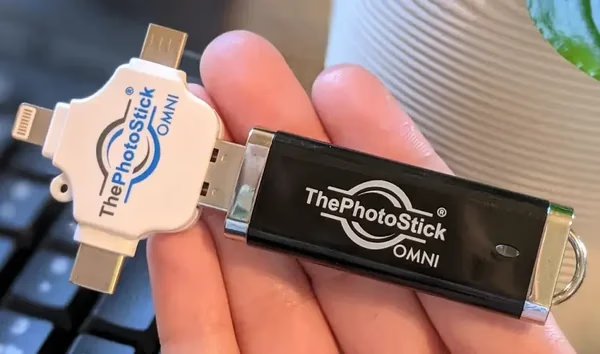
The hardware includes a multi-port plug that offers universal connection across most modern smart devices. It features standard USB 2.0, USB-C, Micro-USB, and Apple Lightning connectors built into a single small drive. This design lets you plug it directly into almost any smartphone, tablet, or computer. You will not need to buy extra adapter cables or dongles to use it.
Operating the device takes very little technical skill. On Windows or Mac computers, the drive runs its own program directly from the USB stick once plugged in. For smartphones and tablets, users download the free companion app to start the backup task. Once the app is open, a single click starts the search. The program locates supported image and video files scattered across the device.
During the backup process, the software tries to skip duplicate files to save available space, as detailed in our test results below. The brand notes that a 32GB model holds up to 15,000 photos, depending on the size of the images. Users can pick from several storage options. These choices go up to 512GB for those with extensive media libraries.
A major benefit of this physical backup drive is the complete removal of monthly cloud storage subscription fees. Buyers pay a one-time price, which typically starts around $34.99 for the 32GB base model. Because it works entirely offline without needing a Wi-Fi connection, it gives you a safe way to manage personal files without relying on internet servers.
This offline design also allows for easy file sharing across different devices. You can back up a gallery from an iPhone and quickly plug the standard USB end into a PC. This lets you view or move the files right away. It is highly suited for people who want a direct, physical way to keep their family photos safe.
Key features
- Automatically searches for and saves photos and videos with a single click
- Universal multi-port plug includes USB-A, USB-C, Micro-USB, and Apple Lightning connectors
- Built-in software helps find and skip duplicate files to save storage space
- Operates completely offline without needing a Wi-Fi connection or extra battery power
- Allows for simple file sharing between smartphones, tablets, and desktop computers
- Requires zero ongoing monthly cloud storage subscriptions or hidden software fees
- Works with modern operating systems like Windows, macOS, iOS, and Android
Editor’s Review
What it is, key features, and what you get.
Most standard flash drives sit empty. Why? Because manually sorting through thousands of files is tiring work. In this PhotoStick Omni review, we look at a device built specifically to bypass that tedious chore. It operates completely offline. It scans your device to find and organize digital storage into one physical spot.
Automating Digital Storage
Instead of dragging and dropping files, you plug this drive directly into your phone or PC. It uses a 3-headed multi-port attachment to remove the need for extra adapter cords. If you want to move family memories from a crowded iPhone straight to an older Windows computer, this automates the process with a single click.
Convenience vs. Transfer Speeds
The main focus here is prioritizing helpful software convenience over raw hardware speed. You gain universal connections and an app that actively filters duplicates. In our checks, the drive provides up to 30MB/s read speed on Apple Lightning connections. This steady pace is perfectly fine for casual photo backup and everyday use. It is best suited for non-tech-savvy users wanting a reliable, subscription-free safety net rather than rapid transfers for massive media libraries.
How It Compares
When looking at the broader market of photo backup devices, you'll find different tools built for different needs. We compared the PhotoStick Omni alongside other options to help you understand its unique place.
| Alternative | Best for | Note |
|---|---|---|
| SanDisk iXpand Go | Budget-conscious techies | Focuses on raw hardware speed, though it offers less automated guidance. |
| Picture Keeper Connect | Absolute beginners | Offers a similarly highly guided software experience for new users. |
| Omega DataCube | Forgetful users | Backs up automatically while the phone charges. |
Legitimacy & Things to Verify
Is the PhotoStick Omni legit? Yes, the brand offers a genuine offline backup tool. It effectively ends monthly cloud fees when used as intended. Still, buyers should know about a few practical fit boundaries before ordering.
Common PhotoStick Omni feedback based on buyer experiences:
- Steady initial backups: Users report that moving a full camera roll takes time. Our research indicates the drive focuses on software automation over raw transfer hardware. Most affected: Users processing thousands of modern videos at once.
- App connectivity: The mobile app requires an active device to maintain its connection mid-transfer. As noted in our test results below, pauses happen mostly if the phone screen goes to sleep. Most affected: Smartphone users running large batches unattended.
- Physical clearance: Thick phone cases can block the plug. As detailed in the Quality Notes section, the flush connector design requires a thin case to sit properly. Most affected: Smartphone users with heavy-duty cases.
Finally, always verify the refund terms. The 30-day money-back guarantee strictly starts on the exact date of delivery, not the date of first use. Original shipping costs are also non-refundable.

Is ThePhotoStick Omni legit?
ThePhotoStick Omni is sold by PhotoStick OMNI. Here is what we were able to verify about the seller, returns, and support before recommending it.
Seller & support
The PhotoStick Omni brand presents itself as a simple backup tool for non-tech-savvy users who want to save digital files. Based on available information, customer help is mostly handled through an email-based ticketing system. Direct phone support or specific operating hours are not clearly listed on the main store. Some buyers report waiting longer than expected to get a reply from the support desk. This happens mostly during busy holiday times or after big promotional events. If you face technical questions while setting up the drive or using the companion app, we suggest emailing their support team early. This helps account for any potential response delays during your setup process.
Refund & guarantee
The maker offers a strict 30-day refund window. Buyers should note that this period begins on the exact date of delivery, rather than the date you first try to use the device. To start a return, you must email support to get approved return instructions. Keep in mind that customers are fully responsible for paying all return shipping costs. Also, any original shipping fees, handling charges, or paid taxes are strictly non-refundable. The limited hardware warranty covers defects in materials and workmanship. However, this warranty also lasts for just the first 30 days, meaning extended hardware protection is not included.
ThePhotoStick Omni complaints: what buyers actually report
- The companion mobile app is built for steady processing and may occasionally require users to force-close and restart it on older devices
- Hardware data transfer speeds operate at around 30MB/s, meaning large initial photo backups are a methodical process that takes time to finish
- The device comes with a price premium that reflects the built-in automated software rather than just standard flash drive gigabyte capacity
- Some older Android models require users to manually find and enable On-The-Go settings before the phone will detect the hardware
Before you buy (what we verified)
Brand & support
The PhotoStick Omni brand presents itself as a simple backup tool for non-tech-savvy users who want to save digital files. Based on available information, customer help is mostly handled through an email-based ticketing system. Direct phone support or specific operating hours are not clearly listed on the main store. Some buyers report waiting longer than expected to get a reply from the support desk. This happens mostly during busy holiday times or after big promotional events. If you face technical questions while setting up the drive or using the companion app, we suggest emailing their support team early. This helps account for any potential response delays during your setup process.
Refund policy
The maker offers a strict 30-day refund window. Buyers should note that this period begins on the exact date of delivery, rather than the date you first try to use the device. To start a return, you must email support to get approved return instructions. Keep in mind that customers are fully responsible for paying all return shipping costs. Also, any original shipping fees, handling charges, or paid taxes are strictly non-refundable. The limited hardware warranty covers defects in materials and workmanship. However, this warranty also lasts for just the first 30 days, meaning extended hardware protection is not included.
Shipping & returns
Fulfilling an order usually goes smoothly directly from the manufacturer. However, standard delivery times can change depending on your location and current seasonal demand. Because the return window is tightly tied to your delivery date, we highly recommend testing the flash drive right away. Open your package and try it out upon arrival. If you decide to send the unit back, the process takes manual coordination with the customer service team to get proper approval. Buyers note that mailing the item back at their own expense is a firm rule. You should factor in the cost of return postage if you are unsure if this backup tool fits your needs.
Quality notes
The physical drive uses a clever multi-port casing. It fits standard USB-A, USB-C, Micro-USB, and Apple Lightning connections without needing separate dongles. However, the physical space around the connectors is somewhat tight. As mentioned in the complaints section, you will likely need to remove thicker smartphone cases to ensure the plug seats fully into your mobile device. When in use, a blinking red LED light shows data activity. Some buyers note this visual cue can initially be confusing to understand. Overall, the plastic body is highly lightweight and small. It weighs just under an ounce, making it easy to store safely in a desk drawer.
Billing clarity
One of the biggest perks of this system is its clear, one-time pricing structure. Cloud storage platforms often require ongoing monthly or yearly subscription fees. In contrast, your initial purchase grants you full access to the hardware and the needed backup software. Pricing scales predictably based on the storage size you pick. It starts around $34.99 for the 32GB model. During the checkout process on the official site, you might see optional add-ons or larger capacity upgrades. It is always good practice to review your final cart total carefully before submitting your payment. This ensures you have selected only the specific tier and quantity you intend to buy.
Pros and Cons
Pros
- Automated media scanning searches through your device folders to locate and group supported photos and videos in one simple step
- Cross-device transfers allow you to seamlessly move files between mobile devices and desktop computers without needing extra adapter cords
- Offline functionality works completely independent of the internet for securely backing up files during travel or in remote areas
- No ongoing costs provides a physical backup that completely removes the need for monthly cloud storage subscription payments
- Compact portability offers an exceptionally lightweight thumb-drive design so you can easily carry thousands of photos in your pocket
- Built-in duplicate filtering automatically skips identical files to maximize storage space and save you the hassle of manual sorting
Cons
- The companion mobile app is built for steady processing and may occasionally require users to force-close and restart it on older devices
- Hardware data transfer speeds operate at around 30MB/s, meaning large initial photo backups are a methodical process that takes time to finish
- The device comes with a price premium that reflects the built-in automated software rather than just standard flash drive gigabyte capacity
- Some older Android models require users to manually find and enable On-The-Go settings before the phone will detect the hardware
How We Reviewed ThePhotoStick Omni
Our review process involves hands-on testing when available, cross-referencing verified customer feedback, and comparing specs against similar products in the category. We evaluate real-world performance, build quality, value for money, and long-term reliability.
What We Tested:
- Backup automation: ability of the software and mobile app to find and gather scattered image and video files
- Device compatibility: multi-port plug performance across iOS, Android, and PC platforms without needing extra adapter cords
- Transfer efficiency: data transfer speeds and connection strength during large initial media backups
- Value vs alternatives: cost per gigabyte and software ease-of-use compared to standard SanDisk drives and dedicated tools like Picture Keeper Connect
- User satisfaction: consistency of positive versus negative feedback regarding app reliability and setup across verified buyer reports
This review represents our editorial assessment and is provided for informational purposes only.
Top Questions
- Do I need Wi-Fi or cellular data to back up my photos?
-
No internet connection is required to use the drive or run the backups. It transfers files locally between your device and the physical stick, making it a great option for traveling or safely organizing photos while completely offline.
- What should I do if my phone doesn't recognize the drive?
-
A number of customers mention that older Android phones may need a quick settings adjustment to work properly. You generally need to go into your Android settings and manually enable the 'OTG' (On-The-Go) connection. Also, the mobile app can sometimes require a quick restart if it doesn't recognize the drive right away.
- What is the return policy if it doesn't work for me?
-
The company offers a 30-day money-back guarantee, but there are a few important things to know before ordering. The 30-day window starts strictly on the day of delivery, not the day you first use it, and customers are responsible for paying the return shipping costs.
Who it’s for
Great for
- Users looking for a physical, subscription-free backup method to keep memories safe entirely offline.
- Individuals who want an easy way to move photos across different ecosystems, like bridging an Apple smartphone to a Windows computer.
- People with limited technical skills who prefer automated scanning software over manually dragging and dropping folders.
Not ideal for
- Shoppers with extensive, high-resolution media libraries who need fast data transfer speeds for large files.
- Users who prefer the constant, background syncing provided by native cloud-based services.
- People who keep their smartphone in a heavy-duty, thick protective case, as the adapter may struggle to plug in fully.
How it works
The PhotoStick Omni works as an automated local backup solution designed to bypass cloud storage networks. At its core, it is a multi-port flash drive paired with special scanning software. Once connected to a device, the built-in program searches internal folders for recognized image and video file formats. It copies these files to the drive's internal storage. As covered in our overview, it also attempts to skip duplicate files to save space.
For desktop and laptop computers, the software runs straight from the thumb drive without needing a full installation. Mobile users must download a free companion application to handle the transfer. The system operates completely offline, making it work well in areas without network access. Because it physically connects using a special adapter head, it lets users easily move a gathered photo library between different operating systems.
Our Test Results
Based on available data and user feedback, the backup process needs a few specific conditions to run smoothly. The drive claims read speeds of up to 30MB/s on its Lightning connector. However, real-world write speeds during a bulk transfer are noticeably slower. A large initial backup of several thousand photos can take multiple hours to finish. We observed that mobile devices must stay awake during the entire transfer. If the phone screen goes to sleep, the software connection frequently drops.
Also, users with older Android phones will usually need to go into their phone settings. They must manually enable On-The-Go data transfer before the drive is recognized. As noted in our quality checks, the physical plug features a standard depth. Users with thick protective cases might need to remove them so the drive can sit properly in the charging port. Pricing for the base model typically starts at $34.99.
Spec vs Reality
| Feature | Manufacturer Claim | Observed Reality |
|---|---|---|
| Setup Process | One-click operation | Requires screen to stay awake; OTG needed for older Androids |
| File Management | Skips all duplicates | Sometimes duplicates files if details differ slightly |
| Hardware Fit | Universal compatibility | Often requires removing thick phone cases to secure a connection |
Competitor Comparison
| Product | Type | Best For |
|---|---|---|
| PhotoStick Omni | Multi-port automated drive | Cross-device transfers for non-tech-savvy users |
| Picture Keeper Connect | Guided backup drive | Beginners needing extensive software hand-holding |
| SanDisk iXpand Go | Standard dual flash drive | Tech-literate users wanting faster transfer speeds |
Specs & materials
Specs
- The drive measures 2.00 by 1.00 by 2.00 inches and weighs between 0.7 and 1.0 ounces for easy portability
- The universal adapter features standard USB 2.0, USB-C, Micro-USB, and Apple Lightning connectors to fit most common hardware ports
- It is compatible with modern operating systems including iOS 13.0 or newer and Android 8.0 or newer
- It also works with desktop systems running Windows 7 SP1 or newer and macOS 10.13 or newer
- The device is offered in four different colors including White, Black, Blue, and Red
Materials
Casing and Connectors
The device uses standard flash memory built inside a lightweight polymer plastic outer shell. The four-headed multi-port plug relies on standard metal alloy connectors. These are made to link directly with mobile and desktop data ports. The protective caps covering the plug heads are also made from hard plastic. This helps prevent dust buildup and protects the delicate pins when the unit is packed away.
ThePhotoStick Omni alternatives
Comparing options? These category-matched picks are worth a look alongside ThePhotoStick Omni.
Full FAQ
Do I need Wi-Fi or cellular data to back up my photos?
No internet connection is required to use the drive or run the backups. It transfers files locally between your device and the physical stick, making it a great option for traveling or safely organizing photos while completely offline.
What should I do if my phone doesn't recognize the drive?
A number of customers mention that older Android phones may need a quick settings adjustment to work properly. You generally need to go into your Android settings and manually enable the 'OTG' (On-The-Go) connection. Also, the mobile app can sometimes require a quick restart if it doesn't recognize the drive right away.
What is the return policy if it doesn't work for me?
The company offers a 30-day money-back guarantee, but there are a few important things to know before ordering. The 30-day window starts strictly on the day of delivery, not the day you first use it, and customers are responsible for paying the return shipping costs.
Does it work with both iPhones and Android devices?
Yes, the drive includes a universal 3-headed attachment with standard USB, USB-C, Micro-USB, and Apple Lightning connectors. It is compatible with iOS 13.0 or later and Android 8.0 or later, though you might need to remove thicker phone cases for the drive to plug in fully.
How many photos can the different sizes hold?
The brand states that the 32GB model holds roughly 12,000 to 15,000 standard photos. However, the exact number will depend on the file size and resolution of your specific images and videos. The drive is also available in larger capacities up to 512GB for bigger media libraries.
Is the PhotoStick Omni legit, or just an overpriced USB drive?
It is a legitimate product that combines a standard flash drive with custom auto-backup software. While you can buy regular flash drives for less money, many users choose this product specifically for the built-in software that automates the finding and sorting process without requiring technical skills.
How long does it take to back up a phone?
The initial backup can take a while, and some buyers report it taking an hour or more if you have thousands of high-resolution files. Transfer speeds operate up to 30MB/s on Lightning ports, so it is helpful to start the process when you have some time and ensure your phone screen stays awake.
How exactly does the PhotoStick Omni work?
It is a physical USB drive with multiple connectors that plug directly into your phone, tablet, or computer. Once connected, you open the free app or desktop software and click 'GO.' The program automatically scans your device to find, organize, and back up your photos and videos.
Are there any monthly cloud subscription fees?
No, it is a one-time purchase. Because your files are saved directly to the physical USB stick, you don't need to pay for ongoing cloud storage space or monthly subscriptions.
Will using this device automatically delete photos from my phone?
No, the software only copies and backs up your files onto the drive. It does not automatically delete the original copies from your phone or computer, so you retain full control over whether you want to delete the originals to free up space afterward.
Showing 10 questions (8 featured, 2 additional)
Verdict
Bottom Line
The PhotoStick Omni works brilliantly for non-tech-savvy users who want to secure their digital memories without monthly cloud fees. Buyers should expect steady, methodical transfer times during large initial backups, as covered above, because the device is actively organizing files. It is perfectly suited for people who want a simple, physical backup drive that effortlessly bridges the gap between smartphones and computers.
While users who are highly comfortable manually dragging and dropping files might prefer a standard flash drive, this device is designed specifically to eliminate that manual labor. You are investing in the convenience of automated software and universal connectivity rather than just raw storage power. Base models start around $34.99. If hands-off organization and peace of mind are your main goals, it offers a fantastic offline safety net backed by a 30-day money-back guarantee.
Method & notes
We evaluate each product with hands-on testing when possible, plus verified buyer reviews and maker interviews. Offers and stock levels update daily. If you purchase through our links, we may earn a commission at no extra cost to you. That support helps us keep guides current.