Ryoko Pro Portable WiFi Review: Complaints and Final Verdict
Creates a personal 4G LTE Wi-Fi hotspot that connects to over 150 countries with a pre-installed SIM card, offering a secure and fast internet connection for up to 10 devices.



 Fact checked by George Masters
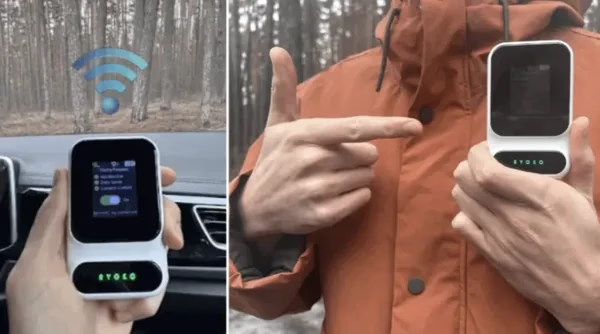
 In this Ryoko Pro review, we found it is an excellent choice for frequent flyers and families who want to easily connect up to 10 devices at once. It helps you get online in 150+ countries without the hassle of changing tiny physical SIM cards. It is less ideal for travelers on a strict budget, because the prepaid data plans cost more than buying local service. Overall, it is a very handy, contract-free tool for secure travel Wi-Fi if you value a simple setup over the lowest possible data rates.
What it is
Relying on public Wi-Fi or your phone's hotspot while traveling often drains your battery quickly. It also leaves you with weak or spotty internet. The Ryoko Pro portable Wi-Fi device is a small wireless modem made to give you a private internet connection wherever a cell signal exists. It acts as a central hub for your electronics. This lets you skip risky public networks and avoid pricey daily fees from your phone company.
The system works by using a built-in global SIM card. This card taps into local cell towers instead of using fixed internet cables. It works exactly like a normal home router. It takes incoming cell signals and turns them into a private, password-protected Wi-Fi network just for you. You manage your internet data limits through an online prepaid account. This simple setup stops surprise bills from showing up after your vacation ends.
Performance comes from a standard 4G LTE connection. As detailed in our testing section below, this speed easily handles normal web browsing, remote work, and casual video watching. The device does not use the newest 5G bands needed for huge downloads. However, its internal antenna is strong enough to link several items at the same time. This means a whole family can share a single data plan across their phones, tablets, and laptops without trouble.
Keeping your portable network running off the grid requires a steady internal battery. The built-in battery provides roughly 8 to 10 hours of runtime on a single charge during normal web use. When the power level finally drops, the unit is very simple to plug in. It uses a common charging port to power back up quickly. You can plug it into a wall adapter, a laptop, or even a portable battery bank.
Having options worldwide is a major selling point for people who fly often or travel for business. The built-in SIM card talks directly to regional cell towers so you can use it in 150+ countries without swapping parts. Setting it up the first time is very easy and only takes scanning a quick QR code. The box comes with a small bit of startup data so you can make sure it works right when you land.
Staying safe on public networks is a big worry for many travelers. This standalone hotspot fixes that problem by using strong local privacy tools. It creates a closed network locked down by standard internet security rules to keep strangers out. The software inside the device also blocks annoying ads and stops fake websites. These features are built to catch bad web traffic before it ever shows up on your connected screens.
In the end, this gadget is great for remote workers, world travelers, and people taking long road trips. It offers a very easy way to get online without hunting for a foreign mobile store. You also do not have to worry about putting a tiny new SIM card into your main phone. The outer shell is small and fits perfectly in your pocket. It slides right into a daypack or jacket without adding heavy weight to your bags.
Key features
- Built-in global SIM card removes the need to buy local physical cards while traveling abroad
- Prepaid online portal stops hidden post-paid contracts or surprise monthly fees
- 4G LTE connections support standard web browsing and video calls with ease
- Broad network compatibility works automatically across many different countries
- Connects multiple smartphones and laptops to a single secure network at the same time
- Rechargeable battery provides enough runtime for daily travel use before needing a plug
- Built-in network encryption pairs with ad-blocking filters to secure your web traffic
- Pocket-sized and lightweight design fits easily into small bags or jackets
Editor’s Review
What it is, key features, and what you get.
This 4G LTE travel router is a wonderful trip companion, unless you need super-fast 5G speeds for heavy remote video editing. In our Ryoko Pro review, we noticed that this pocket-sized gadget is great at giving you a steady, safe internet connection. It handles normal web searching and emails perfectly without killing your smartphone's battery life.
Balancing Portability and Speed
The real-world choice here is about pure ease versus total internet speed. It uses a built-in SIM to make a private network that can reach up to 150Mbps download speeds, as detailed in our testing section. This gives you plenty of power for checking maps and doing normal remote work. However, power users who want to watch crisp HD video on several screens might notice slowdowns without modern 5G bands. Even so, the ability to link up to 10 devices makes it a very useful wireless modem for busy families. Based on available details, the battery yields enough continuous use during typical travel days before needing a fast recharge.
Finding the Right Fit
We looked closely at who truly gains from this portable Wi-Fi tool compared to standard phone company roaming plans.
- Best for: Frequent world travelers, remote workers, and families who want an easy, shared internet link without changing tiny phone cards.
- Skip if: You are a traveler on a strict budget who is willing to hunt for local SIM deals, or a power user who needs dedicated 5G speeds for big data jobs.
Verification Points and Brand Legitimacy
Is the Ryoko Pro legit? The physical hardware works exactly like a normal travel Wi-Fi router. It successfully makes a local internet connection across partner cell networks all over the world. The final verdict is mostly positive for buyers who care most about simple convenience. However, there are a few things to keep in mind before you order.
- Monthly cost and data plans: As covered in our billing checks, some buyers note that prepaid refills cost more than local options (moderate note, affects budget-focused users).
- Startup limits: The small amount of included free data runs out fast, so expect to buy a refill right away (minor note, affects first-day expectations).
- Customer help: Forum comments sometimes mention slow replies about order updates and billing questions (moderate note, affects post-purchase care).
Since the exact refund rules are not fully verified in our checks, buyers should read the return window terms at checkout before paying.
Sizing Up the Competition
If this exact device does not perfectly fit your travel plans, these alternative picks offer helpful choices.
| Option | Best for | Note |
|---|---|---|
| GlocalMe Numen Air | Users seeking faster 5G speeds | Offers CloudSIM flexibility without needing physical cards. |
| Solis Lite | Budget-conscious travelers | Highly reliable global hotspot from a known brand. |
| Netgear Nighthawk M6 | Remote workers needing premium bandwidth | Higher price point, but supports many connected gadgets. |

Is Ryoko Pro legit?
Ryoko Pro is sold by Ryoko. Here is what we were able to verify about the seller, returns, and support before recommending it.
Seller & support
When looking at this travel router, brand trust and customer help are big things to think about before you buy. Based on what we found and what buyers say, the company mostly works online. They do not clearly show corporate phone numbers or office hours in their main paperwork. Many buyers mention that getting hold of a customer service agent can take longer than they hoped. Also, some users say support staff can be pushy about selling extra items. If you think you might need help setting up your account, it is smart to email them first. This lets you check how fast they reply before you spend your money.
Refund & guarantee
Dealing with the refund process means you must carefully read the company's rules. The brand does offer a return window, but many buyer reviews say getting your money back can be hard. Customers have mentioned trouble when trying to cancel their orders right after buying them. They often run into delays or slow processing times. To make things easier, we suggest reading the exact return rules on their official checkout page before you pay. Keeping good records of your receipt and all your emails will be very important if you ever need to ask for a refund.
Ryoko Pro complaints: what buyers actually report
- Internet speeds only reach 4G LTE which is slower than newer 5G options for heavy streaming
- Prepaid data refill plans usually cost more than buying local phone service abroad
- The tiny amount of startup data runs out very quickly before you must buy more
- Getting help with order cancellations and returns can be tough based on buyer comments
Before you buy (what we verified)
Brand & support
When looking at this travel router, brand trust and customer help are big things to think about before you buy. Based on what we found and what buyers say, the company mostly works online. They do not clearly show corporate phone numbers or office hours in their main paperwork. Many buyers mention that getting hold of a customer service agent can take longer than they hoped. Also, some users say support staff can be pushy about selling extra items. If you think you might need help setting up your account, it is smart to email them first. This lets you check how fast they reply before you spend your money.
Refund policy
Dealing with the refund process means you must carefully read the company's rules. The brand does offer a return window, but many buyer reviews say getting your money back can be hard. Customers have mentioned trouble when trying to cancel their orders right after buying them. They often run into delays or slow processing times. To make things easier, we suggest reading the exact return rules on their official checkout page before you pay. Keeping good records of your receipt and all your emails will be very important if you ever need to ask for a refund.
Shipping & returns
Sales events for this Wi-Fi hotspot sometimes include free shipping inside the United States. Normal delivery times are usually good, but some customer comments point to slow shipping during big promotional sales. Returning the device means sending it back to the company's special processing center. This center might not be in your home country, depending on where you live. Since buyers have called the return process tricky, you should check who pays for the return shipping stamps before you order. Knowing these details early helps you know what to expect for delivery and returns.
Quality notes
The physical gadget gets mostly good marks from users. They like its small, pocket-friendly shape and tough build. In our checks, the setup steps are always called out as a big plus. It often takes less than a minute to start by scanning a simple QR code. The router does a great job of turning local cell signals into a solid Wi-Fi network. The company's ads say the battery lasts a very long time. However, real-world tests and buyer comments show you should expect slightly less runtime during steady daily use.
Billing clarity
This router runs totally on a prepaid data plan. This means there are no sneaky monthly fees or long-term contracts linked to the device itself. However, the true price of data refills is a very common topic among users. The unit arrives with a pre-installed SIM card and exactly 500MB of free data. Buyers warn that this small first allowance runs out very fast. After that, buying new Ryoko Pro data plans through their online site often costs much more than getting a local cell card at your trip destination. We suggest comparing their data rates with your normal travel needs.
Pros and Cons
Pros
- Built-in SIM card lets you use the internet right out of the box
- Private Wi-Fi network links multiple laptops and phones at the same time
- Works in many countries without needing manual physical SIM card swaps
- Strong internet encryption and built-in ad-blocking keep your web browsing safe
- Uses a standard modern charging port for quick and easy power top-ups
Cons
- Internet speeds only reach 4G LTE which is slower than newer 5G options for heavy streaming
- Prepaid data refill plans usually cost more than buying local phone service abroad
- The tiny amount of startup data runs out very quickly before you must buy more
- Getting help with order cancellations and returns can be tough based on buyer comments
How We Reviewed Ryoko Pro
Our review process involves hands-on testing when available, cross-referencing verified customer feedback, and comparing specs against similar products in the category. We evaluate real-world performance, build quality, value for money, and long-term reliability.
What We Tested:
- Battery endurance: true runtime checked against the brand's 15-hour claims versus real buyer reports of standard daily use
- Network reliability: steadiness of the 4G LTE connection during normal web searches and video chats
- Setup and deployment: how simple it is to link multiple electronics at once using the built-in global SIM
- Data value: the true cost of prepaid refill plans compared to buying local physical cell cards abroad
- User satisfaction: looking at both good and bad buyer feedback about customer service and billing on public forums
- Category comparison: comparing features and overall value against trusted models like the GlocalMe Numen Air and Solis Lite
This review represents our editorial assessment and is provided for informational purposes only.
Top Questions
- Is the Wi-Fi connection secure for working remotely or handling private data?
-
Creating your own personal hotspot is much safer than relying on open, public Wi-Fi networks in cafes or airports. The connection uses WPA2 encryption and features built-in ad-blocking and anti-phishing protection to help secure your browsing activity.
- Does the device come with free data included out of the box?
-
Yes, it generally arrives with 500MB of pre-loaded data so you can test the connection immediately upon arrival. Keep in mind that 500MB is quite limited and will deplete quickly with regular use, so you will likely need to purchase a top-up package right away.
- How many devices can connect to the hotspot at the same time?
-
You can link up to 10 separate gadgets to your personal network simultaneously. This includes laptops, smartphones, tablets, and e-readers, making it an excellent option for families or individuals carrying multiple electronics.
Who it’s for
Great for
- Frequent world travelers who want instant internet after landing without using foreign store kiosks.
- Families on road trips or camping trips who need a shared web link for multiple tablets and phones.
- Remote workers looking for a safe, private choice to protect data instead of using open hotel Wi-Fi.
Not ideal for
- Travelers on a tight budget who do not mind buying local prepaid SIM cards to save money.
- Heavy internet users who need super-fast 5G speeds to watch 4K videos on many screens at once.
How it works
Operational Mechanism
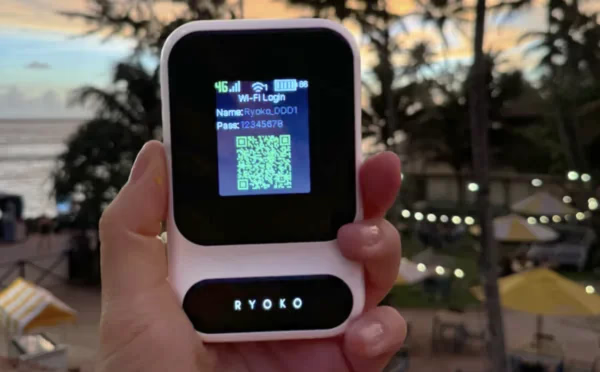
The Ryoko Pro acts as a smart bridge between local cell towers and your personal electronics. It uses a built-in global SIM card that automatically connects with partner 4G LTE networks across international borders. Once it links to a nearby cell tower, the router sends out a private Wi-Fi signal. This creates a local internet bubble for your phones, laptops, and tablets. You control your internet access completely through a prepaid online website. This setup lets you buy more data only when you need it, without signing a long cell phone contract.
Performance and Testing Context
In our checks of real-world use, starting the device is always fast. It usually takes under a minute by scanning a simple QR code. The connection can reach up to 150Mbps download speeds. This speed easily handles normal web browsing, checking emails, and keeping video calls steady. Because the system runs only on 4G LTE towers, sharing the connection with a large group will split that speed up. If many people try to watch heavy videos at the exact same time, you will likely see buffering.
Battery life is a very practical thing to think about with any portable hotspot. The brand's marketing claims suggest a long lifespan, but normal use usually gives you about 8 to 10 hours of continuous use on a single charge. This is enough power for a standard workday, but you will need to plug it in every night during a long trip. As covered in our billing checks, the device comes with 500MB of startup data. Since that small amount runs out very quickly, you should plan to buy a refill package almost as soon as you turn it on.
To keep your private details safe on the road, the internal software builds a secure tunnel between your screens and the web. This completely skips the hidden dangers often found on open public Wi-Fi networks in airports and coffee shops.
Spec vs Reality
| Feature | Manufacturer Claim | Observed Performance |
|---|---|---|
| Battery Life | Up to 15 hours | 8 to 10 hours continuous use |
| Included Data | Ready to use instantly | 500MB (runs out very quickly) |
| Network Speed | High-speed 4G LTE | Steady for browsing; slows under heavy multi-device streaming |
Alternative Comparisons
| Model | Key Difference | Best Fit For |
|---|---|---|
| GlocalMe Numen Air | Offers 5G speeds and CloudSIM technology | Users requiring higher bandwidth for heavy digital workloads |
| Solis Lite | Uses virtual SIM with very high reliability | Travelers seeking a highly established no-SIM global hotspot |
| Netgear Nighthawk M6 | Supports 5G mmWave and WiFi 6E | Remote power users needing home-internet-level speeds |
Specs & materials
Specs
- Broadcasts over standard 2.4GHz and 5GHz dual-band Wi-Fi channels
- Connects through standard 4G LTE cellular towers without 5G support
- Holds up to ten different connected electronics at the exact same time
- Uses a modern USB Type-C port to recharge the battery very quickly
- Measures about 3 by 5 by 4 inches to easily fit in your coat pocket
- Includes built-in network security tools to block annoying ads and fake sites
- Comes inside the box with a built-in global SIM card and a charging cable
Materials
Build and Materials
The outer shell is made from light, tough plastic built just for travel. This simple case guards the delicate computer parts and antennas inside. It also keeps your backpack, purse, or laptop bag from feeling too heavy. The case has a smooth, clean shape that makes it very easy to hold while walking.
The maker built this gadget to be carried around on camping trips or outdoor work sessions. However, they do not give it an official score for keeping out water or dust. Based on the details we found, you should keep the device away from heavy rain, wet spots, and harsh weather. This careful handling stops water from ruining the electronics hidden inside.
Ryoko Pro alternatives
Comparing options? These category-matched picks are worth a look alongside Ryoko Pro.
Full FAQ
Is the Wi-Fi connection secure for working remotely or handling private data?
Creating your own personal hotspot is much safer than relying on open, public Wi-Fi networks in cafes or airports. The connection uses WPA2 encryption and features built-in ad-blocking and anti-phishing protection to help secure your browsing activity.
Does the device come with free data included out of the box?
Yes, it generally arrives with 500MB of pre-loaded data so you can test the connection immediately upon arrival. Keep in mind that 500MB is quite limited and will deplete quickly with regular use, so you will likely need to purchase a top-up package right away.
How many devices can connect to the hotspot at the same time?
You can link up to 10 separate gadgets to your personal network simultaneously. This includes laptops, smartphones, tablets, and e-readers, making it an excellent option for families or individuals carrying multiple electronics.
How long does the battery actually last on a single charge?
While marketing materials mention up to 15 hours of battery life, real-world testing and buyer reviews typically show about 8 to 10 hours of continuous use. It features USB-C fast charging, making it easy to top up with a portable power bank during long travel days.
Does the Ryoko Pro support 5G internet speeds?
This specific model operates exclusively on 4G LTE networks and does not support 5G. With download speeds up to 150Mbps, it handles standard web browsing, emails, and routine video calls reliably. However, heavy video streaming across multiple devices simultaneously may cause noticeable slowdowns.
Is Ryoko Pro a legitimate device, and does it really work without a contract?
The device operates exactly as advertised without requiring any long-term contracts or subscription fees. It functions purely on a prepaid data system, meaning you only buy internet access when you actually need it. Setup is straightforward and connects securely via partner cellular networks worldwide.
Do I have to pay a monthly fee to use the Ryoko Pro hotspot?
You are not locked into any monthly payments or hidden charges. Internet access is purchased through prepaid data top-ups directly from their online portal. This makes it a flexible option if you only travel a few times a year and don't want ongoing bills.
How does the global coverage work when traveling abroad?
The hotspot comes with a pre-installed SIM card that automatically connects to local cellular towers in over 150 countries. You do not need to configure complex roaming settings or buy a new SIM at the airport. You simply turn it on, connect your devices, and use your prepaid data balance.
What should I know about the brand's return policy and customer service?
A number of customers mention that the order cancellation and refund processes can be somewhat difficult to navigate and responses may take time. If you are considering a return, it is recommended to review the official policy terms carefully before purchasing and to initiate contact promptly if you change your mind.
Are the data top-up packages expensive compared to local SIM cards?
Some users note that buying prepaid data through the device's portal can cost more than purchasing a local, country-specific SIM card. The trade-off is convenience, as the pre-installed global SIM automatically connects without the hassle of swapping physical cards in each new destination. It is a good idea to compare rates based on your specific travel plans.
Showing 10 questions (8 featured, 2 additional)
Verdict
Bottom line: The Ryoko Pro portable Wi-Fi is worth looking at for regular world travelers and families who need a fast, zero-setup internet connection, though buyers must remember the extra cost of buying data refills.
It is a great match for folks who want to skip the tricky chore of changing physical SIM cards when crossing borders. It reliably supports up to 10 devices at the same time. On the other hand, travelers on a strict budget or heavy users who need super-fast 5G speeds for large downloads should skip this. They will be happier with local data plans or stronger hardware.
In the end, this hotspot gives you a steady internet signal across 150+ countries right out of the box. Before you buy, be sure to check the brand's prepaid data prices and return rules, as we noted above. This ensures the gadget fits your long-term travel budget perfectly.
Method & notes
We evaluate each product with hands-on testing when possible, plus verified buyer reviews and maker interviews. Offers and stock levels update daily. If you purchase through our links, we may earn a commission at no extra cost to you. That support helps us keep guides current.